

Blender add-onObject Groups
Group it, then step inside.
Organize nested assemblies and overlapping selection sets without replacing your scene’s parenting or Collections.
- Nested groups
- Overlapping selection sets
- Parenting stays as is
Compatibility
Windows tested · Blender 3.3–5.2
Get it on Superhive ↗ (opens in a new tab)Pricing, checkout, downloads and updates are handled on Superhive.
What it does.
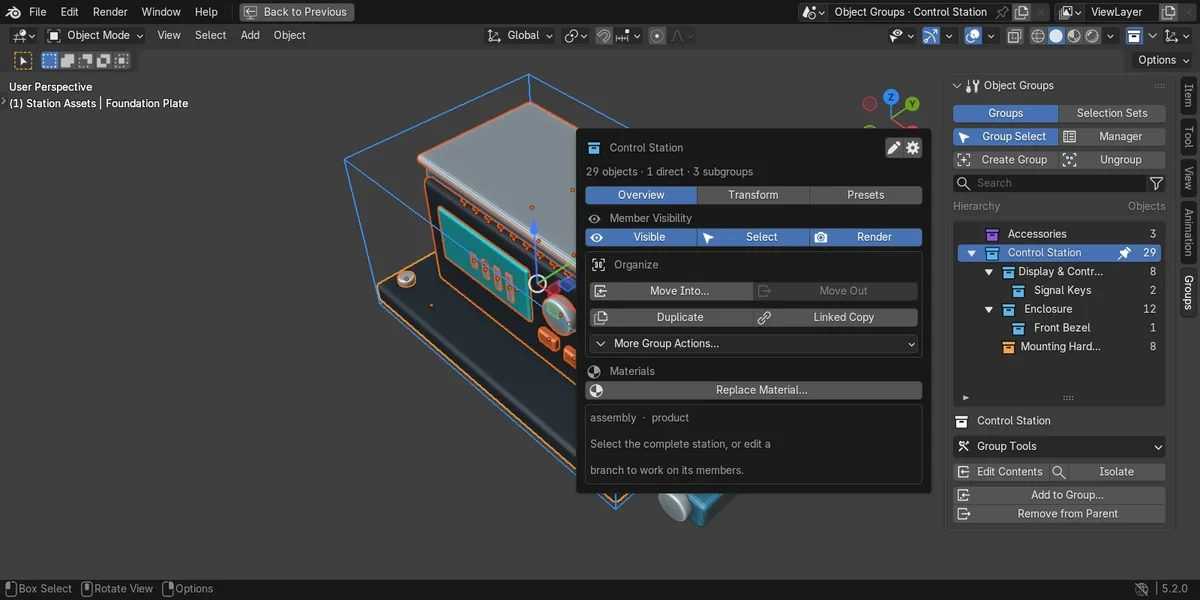
Nest your assemblies
Group objects or combine sibling groups under a new parent, then select a whole assembly at once.
Edit inside a group
Edit Contents reaches individual members; move them to another group or lift them one level up.
Save selection sets
Store overlapping selections apart from the group tree, without controller objects or changes to your Collections.
Deeper group tools
Duplicate groups, manage visibility and materials, preview batch renames and let Auto Group sort by shared properties.
Before you buy.
- Windows tested · Blender 3.3–5.2.
- macOS and Linux are untested.
- Group transforms, library overrides and some contexts have limits; try it on a copy of your scene first.
Want the details?
The full feature list, documentation, changelog and licence options are on Superhive.
Get it on Superhive ↗ (opens in a new tab)Related add-ons.
- Ultimate Utilities Asset preparation, validation and batch export in one sidebar. Combines the functionality of Core Utilities, Export Checker and Fast Export.

- Core Utilities Bring batch naming, materials, UV preparation, transforms, parenting and cleanup into a customizable Blender sidebar.
- Export Checker Inspect geometry, UVs, naming, transforms and other delivery requirements against configurable asset profiles, then review suggested fixes.