Blender add-onAseprite Bridge
Pixel art, kept connected.
Send textures between Blender and Aseprite, paint on existing materials, bring back sprite animation and palettes, and preview your work on the model.
- Crisp pixel-art returns
- Live Sync on save
- Animation and palettes back
Compatibility
Windows only · Blender 3.3–5.2
Get it on Superhive ↗ (opens in a new tab)Pricing, checkout, downloads and updates are handled on Superhive.
What it does.
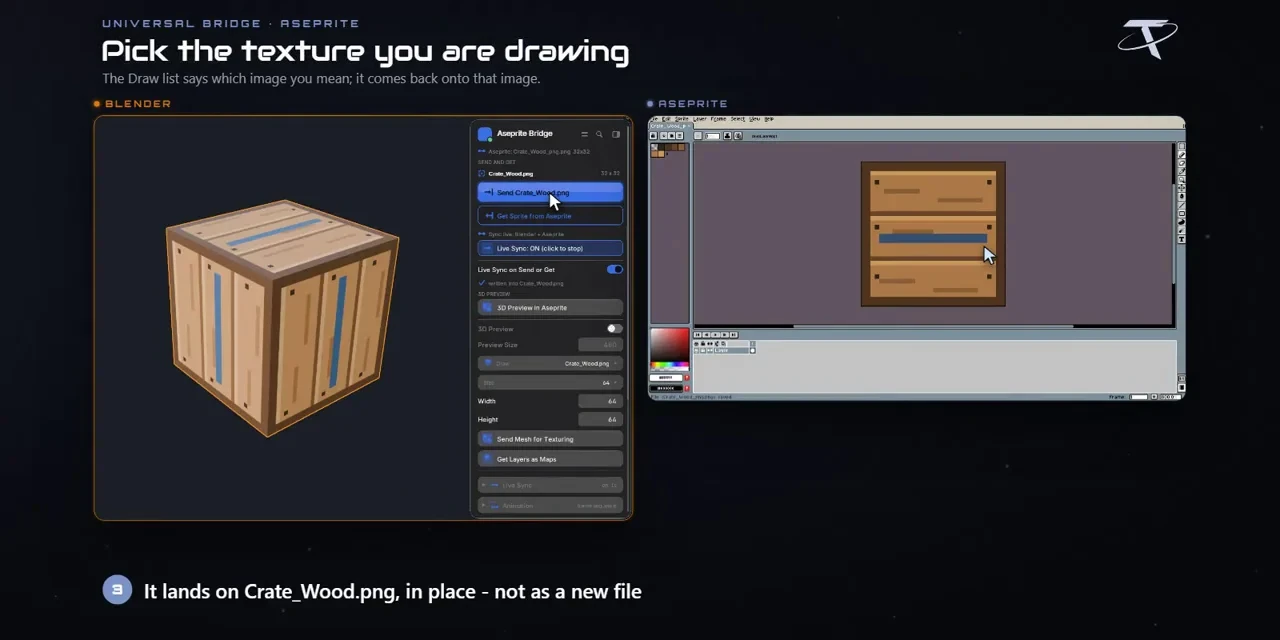
Paint existing textures
Pick a material’s image, paint it in Aseprite, and Get Sprite updates it with Closest filtering for crisp pixels.
Paint with the model in view
Send a mesh to get its maps as layers with a locked UV guide, and preview Blender’s viewport inside Aseprite.
Animation and palettes
Bring back numbered frames or a sprite sheet with timing, and swap palettes between materials and sprites.
Live Sync
Send updates on every save or while you draw, with a minimum gap that limits how often.
Before you buy.
- Windows only · Blender 3.3–5.2.
- Your own copy of Aseprite 1.3 or newer; the companion extension is included.
- The apps exchange local files, and Get or Live Sync can overwrite the selected texture’s file, so work on copies.
Want the details?
The full feature list, documentation, changelog and licence options are on Superhive.
Get it on Superhive ↗ (opens in a new tab)Related add-ons.
- Unreal Engine Bridge Push meshes, collision, sockets and LODs into Unreal’s Content Browser, with project-folder access and live update workflows.
- Unity Bridge Send assets into Unity project folders, sync supported edits and bring exported model files back to Blender.
- Godot Bridge Send GLB or glTF assets into Godot 4 projects and return exported glTF work to Blender.